How does it works?
CentsJS chooses the charitable cause, and the amount available for the consumer user to donate. Of course the user has to opt-in for the donation. The payment is automatically and fully managed by the payment gateway for the cause chosen by Cents. The payment is directly made to the charity either via Cents' Donnor Advised Fund (a charity aggregator) or by creating a merchant account for each charity in the payment gateway.
The payment gateway has just to install the CentsJS library in the proper section (checkout page or thank you page), manage the split payment or double transaction, and communicate to Cents via a webhook when the transaction is paid.
You’ll see the main sequence flows where the entire process is explained, then the guide for the frontend using CentsJS, and finally, the guide for API, which will be used to track the transaction when it’s completed.
All three options have two different sub-flow, involving the management of the transaction id of the donation (an identifier of the donation used by cents to reconcile data):
-
Transaction ID managed by cents: Cents generate a transaction id (
reconciliationId). This id has to be stored by the payment gateway and sent again to cents via webhook when the donation transaction is paid -
Transaction ID managed by the payment gateway: The payment gateway generates a transaction id (
reconciliationId). After the donation transaction is paid this id is sent via webhook to cents
🦾 Our AI engine automatically identifies the most suitable charitable cause for each transaction based on user and merchant data. This approach aims to optimize the total donated amount.
Option 1: Sequence flow donation with the main transaction (split payment)
Seamlessly integrate donations into the checkout process by managing both the purchase and donation amounts in a single split payment transaction.
- Transaction ID managed by Cents
- Transaction ID managed by Payment Gateway
- Upon reaching the checkout page of the payment gateway, the consumer user encounters a Cents widget (via CentsJS). This interactive widget showcases a charity and enables the user to choose a donation amount.
- The consumer user selects an amount, and this info is tracked in Cents' server with additional context info (e.g. order amount, transaction id);
- After the consumer selects an amount, a frontend callback is triggered. CentJS forwards the donation amount to the payment gateway for the donation transaction. Subsequently, when the transaction occurs, this data is relayed to Cents (via backend), enabling Cents to access all user selections and data from the frontend;
- The consumer user pays the e-commerce order (the donation is included in that payment);
- Upon completion of the donation transaction, the payment gateway is required to trigger a webhook/API to CentsJS. This action involves transmitting the final order data and transaction_id to ensure seamless reconciliation with previous records. By following this process, Cents can verify the successful payment of the donation, thereby marking the transaction as complete. It is imperative to execute this procedure through the backend to uphold security standards.
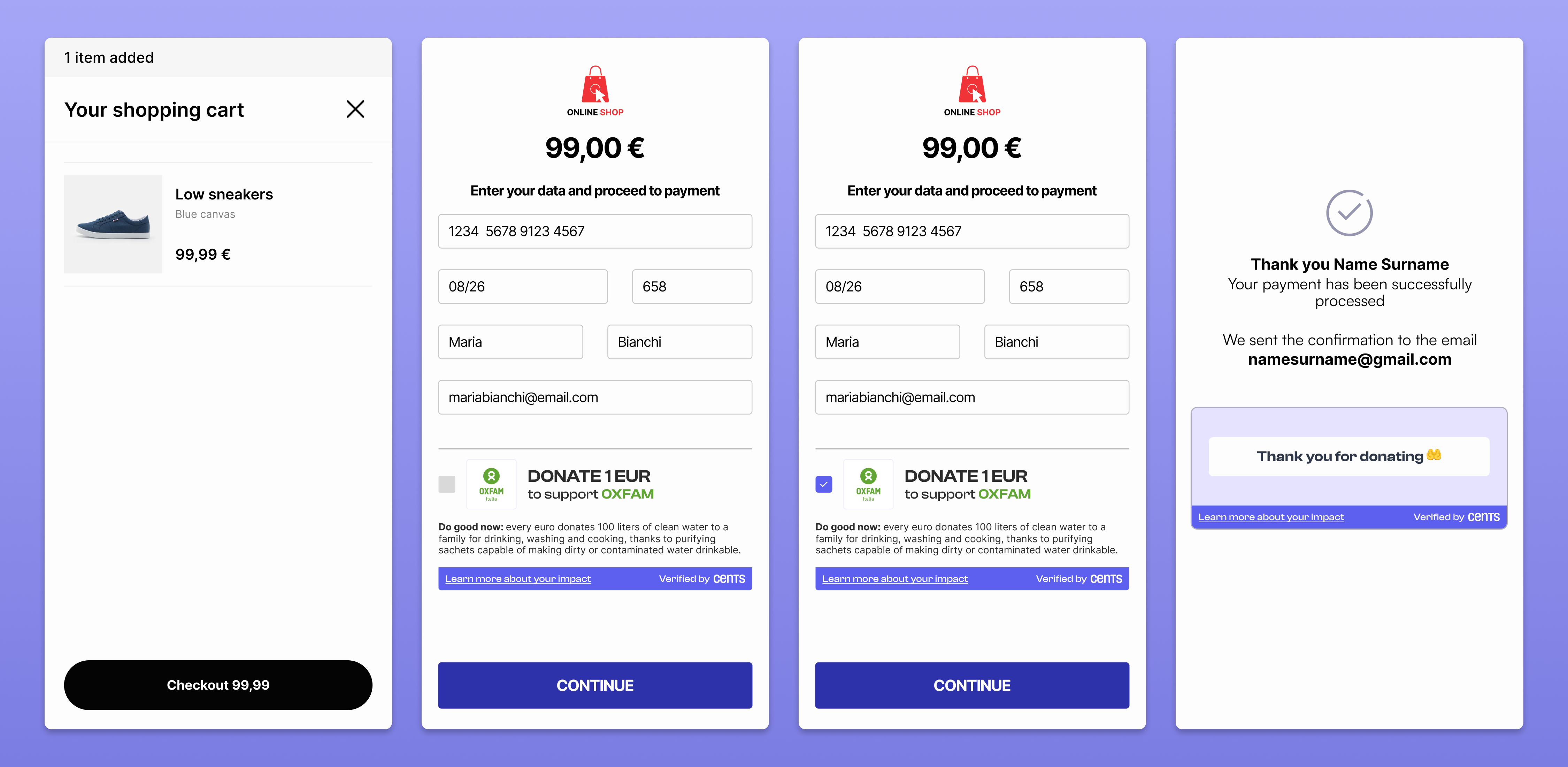
Full donation experience with Cents' widget in the check-out page
In this scenario, the average opt-in is 2.5%.
Option 2: Sequence flow donation as a separate transaction within the main payment
Implement the donation on the checkout page as an independent transaction separate from the purchase.
- Transaction ID managed by Cents
- Transaction ID managed by Payment Gateway
- Upon reaching the checkout page of the payment gateway, the consumer user encounters a Cents widget (via CentsJS). This widget showcases a charity and enables the user to choose a donation amount.
- The consumer user selects an amount, and this info is tracked in Cents' server with additional context info (e.g. order amount);
- Upon selecting an amount, a frontend callback is initiated. CentJS then transmits a transaction_id and the donation amount to the payment gateway for processing the donation. Following this, once the transaction is completed, the information is sent back to Cents (via backend), granting Cents access to all user selections and data from the frontend.
- The consumer user pays the e-commerce order and, at the same time, the donation (as a separate transaction);
- Upon completing the donation transaction, the payment gateway is required to trigger a webhook/API to CentsJS. This action involves transmitting the final order data and transaction_id to ensure seamless reconciliation with previous information. By following this process, Cents can verify the successful payment of the donation, thereby marking the transaction as complete. It is essential to execute this procedure through the backend to uphold security measures.
In this scenario, the payment gateway has to use the same user card for two different transactions
Option 3: Sequence flow donation as a separate transaction after the main payment (thank you page)
Place the donation option on the thank you page, processing it as a separate transaction immediately following the main purchase.
- Transaction ID managed by Cents
- Transaction ID managed by Payment Gateway
- After the consumer completes the payment for their e-commerce order, they will encounter a Cents widget (via CentsJS). This widget displays information about a charity and enables the user to choose a donation amount.
- The consumer user selects an amount, and this info is tracked in Cents' server with additional context info (e.g. order amount);
- Upon selecting a donation amount and initiating the process, a frontend callback is triggered. CentJS proceeds to send a transaction_id and the donation amount to the payment gateway for processing. Subsequently, after the transaction is finalized, the details are relayed back to Cents (via backend), providing Cents with access to all user choices and frontend data.
- Upon completing the donation transaction, the payment gateway is required to trigger a webhook/API to CentsJS. This action involves transmitting the final order data and transaction_id to ensure seamless reconciliation with previous information. By following this process, Cents can verify the successful payment of the donation, thereby marking the transaction as complete. It is essential to execute this procedure through the backend to uphold security measures.
In this scenario, the payment gateway needs to utilize the same user card for two separate transactions on two distinct pages, requiring the card token to be retained across these pages.
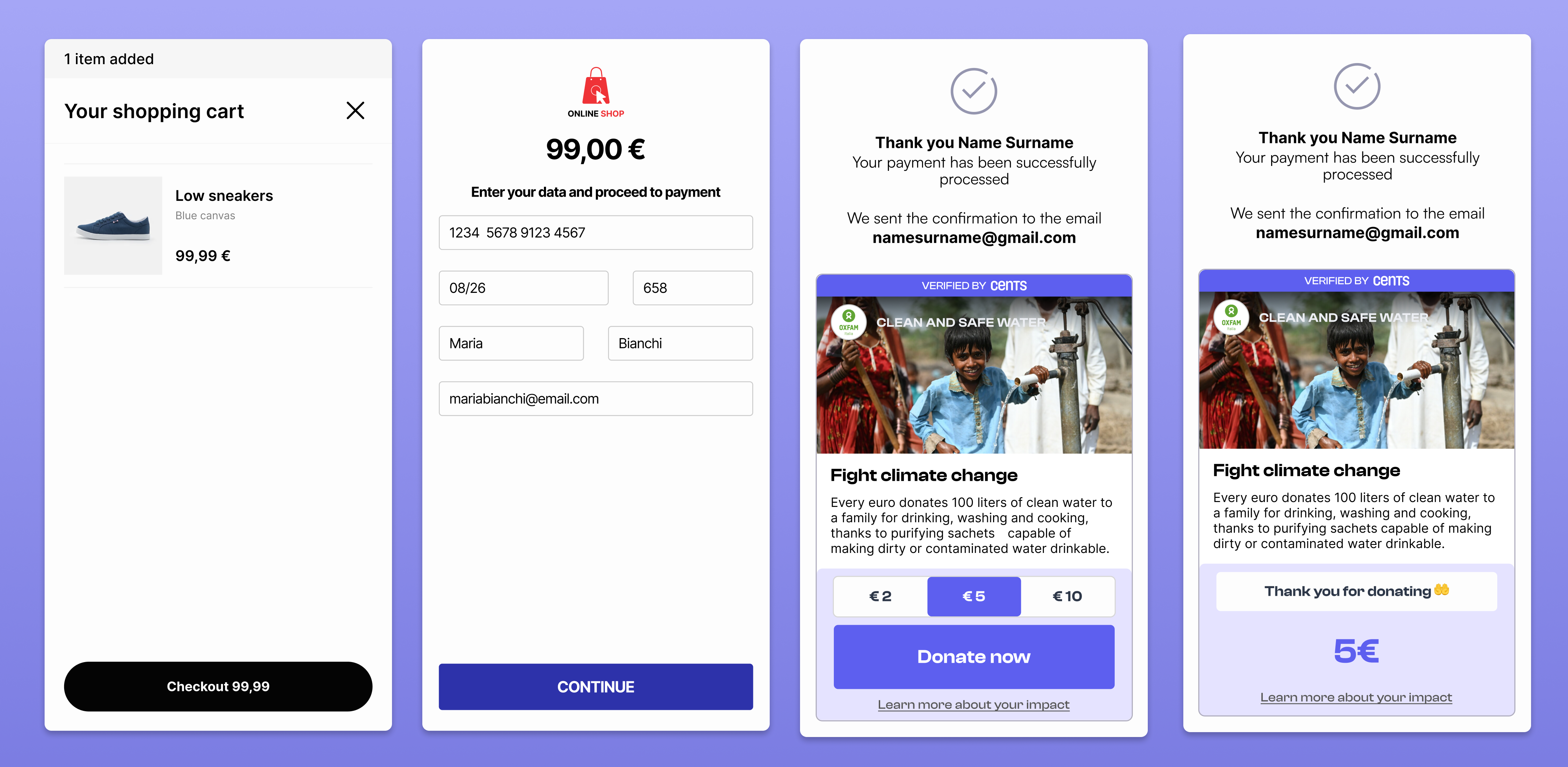
Full donation experience with Cents' widget in the thank you page
In this scenario, the average opt-in rate is 1.5% and the average donation is €2.5.
Contacts
For further assistance, please contact us at: tech@centsdonations.com